
Please Note: This article is written for users of the following Microsoft Excel versions: 2000, 2002, and 2003. If you are using a later version (Excel 2007 or later), this tip may not work for you. For a version of this tip written specifically for later versions of Excel, click here: Appearance of Excel on the Taskbar.
If you are using Excel 2000 (or later), you can control how Excel workbooks appear on your task bar. You can instruct Excel to display only a single task regardless of how many workbooks are open, or you can have it display one task for each workbook.
To specify how Excel utilizes the toolbar, follow these steps:
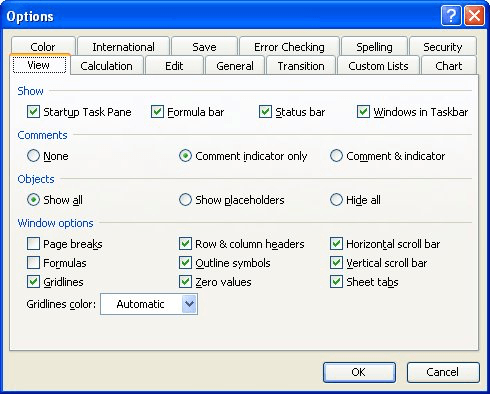
Figure 1. The View tab of the Options dialog box.
ExcelTips is your source for cost-effective Microsoft Excel training. This tip (3028) applies to Microsoft Excel 2000, 2002, and 2003. You can find a version of this tip for the ribbon interface of Excel (Excel 2007 and later) here: Appearance of Excel on the Taskbar.
Create Custom Apps with VBA! Discover how to extend the capabilities of Office 365 applications with VBA programming. Written in clear terms and understandable language, the book includes systematic tutorials and contains both intermediate and advanced content for experienced VB developers. Designed to be comprehensive, the book addresses not just one Office application, but the entire Office suite. Check out Mastering VBA for Microsoft Office 365 today!
Working on a computer system that has multiple monitors can help increase your productivity. If you want to work with ...
Discover MoreExcel provides spell-checking capabilities on the text you enter in a worksheet. It utilizes the same dictionaries and ...
Discover MoreWhen entering data into a range of cells, the cell in which you are working appears in a different color than the other ...
Discover MoreFREE SERVICE: Get tips like this every week in ExcelTips, a free productivity newsletter. Enter your address and click "Subscribe."
There are currently no comments for this tip. (Be the first to leave your comment—just use the simple form above!)
Got a version of Excel that uses the menu interface (Excel 97, Excel 2000, Excel 2002, or Excel 2003)? This site is for you! If you use a later version of Excel, visit our ExcelTips site focusing on the ribbon interface.
FREE SERVICE: Get tips like this every week in ExcelTips, a free productivity newsletter. Enter your address and click "Subscribe."
Copyright © 2026 Sharon Parq Associates, Inc.
 Please Note:
This article is written for users of the following Microsoft Excel versions: 2000, 2002, and 2003. If you are using a later version (Excel 2007 or later), this tip may not work for you. For a version of this tip written specifically for later versions of Excel, click here:
Please Note:
This article is written for users of the following Microsoft Excel versions: 2000, 2002, and 2003. If you are using a later version (Excel 2007 or later), this tip may not work for you. For a version of this tip written specifically for later versions of Excel, click here: 
Comments