
Gloria asked if there was a way, in a 3-D pie chart, to "explode" groups of slices, instead of individual slices. When you pick an exploded pie chart as your chart type, all the slices of the pie are "pushed back," away from the center of the pie. Gloria was looking for a way to have different slices grouped together in the view.
There is no way to group individual slices of the pie prior to exploding, nor does Excel provide a way to push selected slices together. There are, however, a couple of workarounds that can be tried.
The first approach is to make a chart for every grouping in your original data. Each chart is based on the entire original data table, but you set the colors for the group to be represented by the particular chart, and then make the other groups "invisible" by turning off their borders and colors. You can then overlay the charts to get the desired effect. This approach obviously would require some experimentation to get exactly the right look, but it is a great approach if the data that underlies the table will change periodically.
Another approach is to treat your pie chart as a drawing object. This gives you a great deal of flexibility, and is most appropriate for "one up" charts that won't be later changed. Follow these general steps:
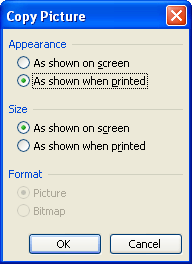
Figure 1. The Copy Picture dialog box.
ExcelTips is your source for cost-effective Microsoft Excel training. This tip (2825) applies to Microsoft Excel 97, 2000, 2002, and 2003.

Dive Deep into Macros! Make Excel do things you thought were impossible, discover techniques you won't find anywhere else, and create powerful automated reports. Bill Jelen and Tracy Syrstad help you instantly visualize information to make it actionable. You’ll find step-by-step instructions, real-world case studies, and 50 workbooks packed with examples and solutions. Check out Microsoft Excel 2019 VBA and Macros today!
Add a drawing object to a worksheet and chances are good you'll need to move it in some way. Here's how to use the mouse ...
Discover MoreTitles can be a great addition to any chart. They help provide explanatory information about the information in the ...
Discover MoreExcel allows you to easily add graphics to a worksheet. If you want to crop an image you previously added, here's how to ...
Discover MoreFREE SERVICE: Get tips like this every week in ExcelTips, a free productivity newsletter. Enter your address and click "Subscribe."
There are currently no comments for this tip. (Be the first to leave your comment—just use the simple form above!)
Got a version of Excel that uses the menu interface (Excel 97, Excel 2000, Excel 2002, or Excel 2003)? This site is for you! If you use a later version of Excel, visit our ExcelTips site focusing on the ribbon interface.
FREE SERVICE: Get tips like this every week in ExcelTips, a free productivity newsletter. Enter your address and click "Subscribe."
Copyright © 2026 Sharon Parq Associates, Inc.

Comments