
When creating a worksheet in which information must be entered into specific cells, you may find it helpful to shade the cells if they are blank, but have the shading removed if something is entered into the cell. You can easily accomplish this task by using the conditional formatting feature in Excel. Follow these steps:
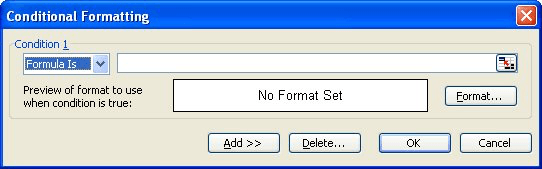
Figure 1. The Conditional Formatting dialog box.
=ISBLANK(A1)
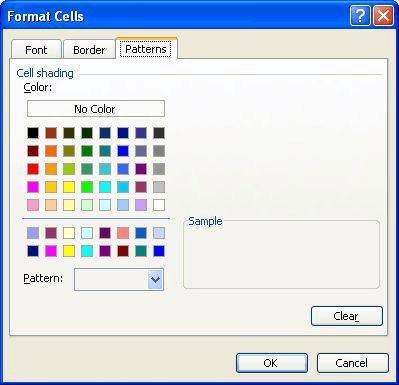
Figure 2. The Patterns tab of the Format Cells dialog box.
All the empty cells among those selected in step 1 should now appear shaded. When you enter something into one of the shaded cells, the shading should disappear.
ExcelTips is your source for cost-effective Microsoft Excel training. This tip (2800) applies to Microsoft Excel 97, 2000, 2002, and 2003.

Excel Smarts for Beginners! Featuring the friendly and trusted For Dummies style, this popular guide shows beginners how to get up and running with Excel while also helping more experienced users get comfortable with the newest features. Check out Excel 2019 For Dummies today!
If an error exists in a formula tucked inside a conditional format, you may never know it is there. There are ways to ...
Discover MoreIf you want to highlight cells that contain certain characters, you can use the conditional formatting features of Excel ...
Discover MoreNeed to have a sound played if a certain condition is met? It is rather easy to do if you use a user-defined function to ...
Discover MoreFREE SERVICE: Get tips like this every week in ExcelTips, a free productivity newsletter. Enter your address and click "Subscribe."
2020-07-29 14:26:10
Megan B
Is there a way to shade cells with values already in them, but have them go blank when the values are edited?
2020-04-05 13:10:41
Ashraf Hafez
GreatnThank You
Got a version of Excel that uses the menu interface (Excel 97, Excel 2000, Excel 2002, or Excel 2003)? This site is for you! If you use a later version of Excel, visit our ExcelTips site focusing on the ribbon interface.
FREE SERVICE: Get tips like this every week in ExcelTips, a free productivity newsletter. Enter your address and click "Subscribe."
Copyright © 2026 Sharon Parq Associates, Inc.

Comments