
You can completely change Excel to reflect how you want to do your work. One of the elements of the program you can change is the toolbars. You can add, remove, or edit buttons that appear on any toolbar. To customize a toolbar, follow these steps:
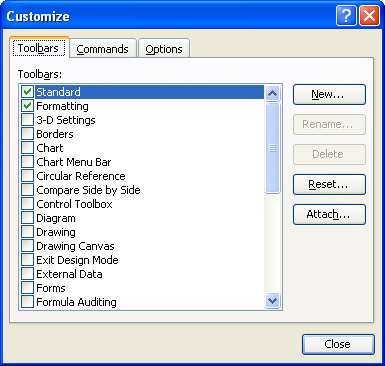
Figure 1. The Toolbars tab of the Customize dialog box.
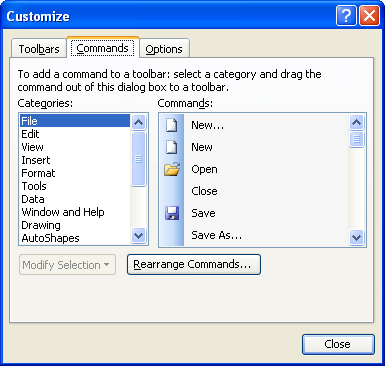
Figure 2. The Commands tab of the Customize dialog box.
ExcelTips is your source for cost-effective Microsoft Excel training. This tip (2724) applies to Microsoft Excel 97, 2000, 2002, and 2003.
Excel Smarts for Beginners! Featuring the friendly and trusted For Dummies style, this popular guide shows beginners how to get up and running with Excel while also helping more experienced users get comfortable with the newest features. Check out Excel 2019 For Dummies today!
Excel allows you to modify virtually all aspects of its user interface. One of the things you can change is the images ...
Discover MoreDo you wish that the buttons on your Excel toolbars were easier to see and use? The answer could be to turn on the large ...
Discover MoreIf your Formula bar disappears when you load a workbook, it could be due to the presence of a macro that turns it off. ...
Discover MoreFREE SERVICE: Get tips like this every week in ExcelTips, a free productivity newsletter. Enter your address and click "Subscribe."
There are currently no comments for this tip. (Be the first to leave your comment—just use the simple form above!)
Got a version of Excel that uses the menu interface (Excel 97, Excel 2000, Excel 2002, or Excel 2003)? This site is for you! If you use a later version of Excel, visit our ExcelTips site focusing on the ribbon interface.
FREE SERVICE: Get tips like this every week in ExcelTips, a free productivity newsletter. Enter your address and click "Subscribe."
Copyright © 2026 Sharon Parq Associates, Inc.

Comments