
As you are customizing Excel to reflect your working habits, there may be times when you want to create your own custom toolbar. You can create a toolbar by following these steps:
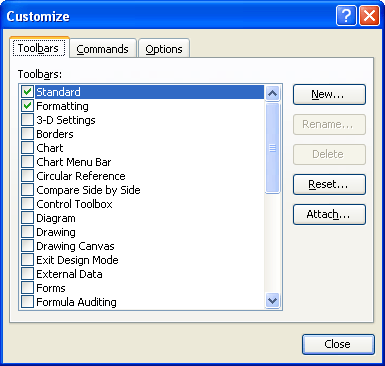
Figure 1. The Toolbars tab of the Customize dialog box.
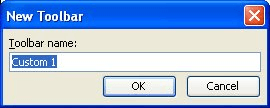
Figure 2. The New Toolbar dialog box.
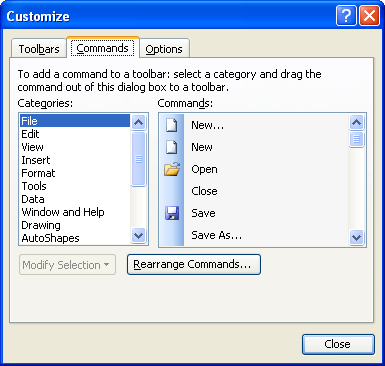
Figure 3. The Commands tab of the Customize dialog box.
ExcelTips is your source for cost-effective Microsoft Excel training. This tip (2722) applies to Microsoft Excel 97, 2000, 2002, and 2003.
Solve Real Business Problems Master business modeling and analysis techniques with Excel and transform data into bottom-line results. This hands-on, scenario-focused guide shows you how to use the latest Excel tools to integrate data from multiple tables. Check out Microsoft Excel Data Analysis and Business Modeling today!
Excel normally displays the font list on the toolbar or using the very fonts it is displaying. Here's how to change that ...
Discover MoreToolbars allow you to access common tasks quickly and easily. Excel provides a wide variety of toolbars, and you can even ...
Discover MoreCreate your own toolbars and, at some point, you may have a hankering to change their names. Here's how you can make the ...
Discover MoreFREE SERVICE: Get tips like this every week in ExcelTips, a free productivity newsletter. Enter your address and click "Subscribe."
There are currently no comments for this tip. (Be the first to leave your comment—just use the simple form above!)
Got a version of Excel that uses the menu interface (Excel 97, Excel 2000, Excel 2002, or Excel 2003)? This site is for you! If you use a later version of Excel, visit our ExcelTips site focusing on the ribbon interface.
FREE SERVICE: Get tips like this every week in ExcelTips, a free productivity newsletter. Enter your address and click "Subscribe."
Copyright © 2026 Sharon Parq Associates, Inc.

Comments