
When you create a new Excel spreadsheet, it contains page headers. If you want to get rid of the page header, follow these steps:
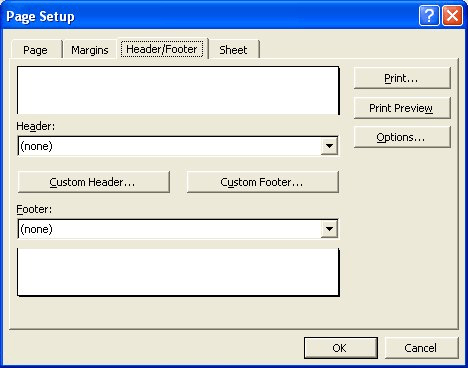
Figure 1. The Header/Footer tab of the Page Setup dialog box.
ExcelTips is your source for cost-effective Microsoft Excel training. This tip (2693) applies to Microsoft Excel 97, 2000, 2002, and 2003.
Program Successfully in Excel! This guide will provide you with all the information you need to automate any task in Excel and save time and effort. Learn how to extend Excel's functionality with VBA to create solutions not possible with the standard features. Includes latest information for Excel 2024 and Microsoft 365. Check out Mastering Excel VBA Programming today!
Referencing information between cells in a worksheet is a piece of cake using some elemental formulas. You cannot, ...
Discover MoreNeed to copy headers and footers from one worksheet to another? How about from one workbook to another? Here are some ...
Discover MoreDon't like the default date format used by Excel when you place the date in a header or footer? You can use a macro to ...
Discover MoreFREE SERVICE: Get tips like this every week in ExcelTips, a free productivity newsletter. Enter your address and click "Subscribe."
There are currently no comments for this tip. (Be the first to leave your comment—just use the simple form above!)
Got a version of Excel that uses the menu interface (Excel 97, Excel 2000, Excel 2002, or Excel 2003)? This site is for you! If you use a later version of Excel, visit our ExcelTips site focusing on the ribbon interface.
FREE SERVICE: Get tips like this every week in ExcelTips, a free productivity newsletter. Enter your address and click "Subscribe."
Copyright © 2026 Sharon Parq Associates, Inc.

Comments