
If you are using page numbers with your spreadsheet, you can adjust the number used as the first page number in your spreadsheet. To change the starting page number, follow these steps:
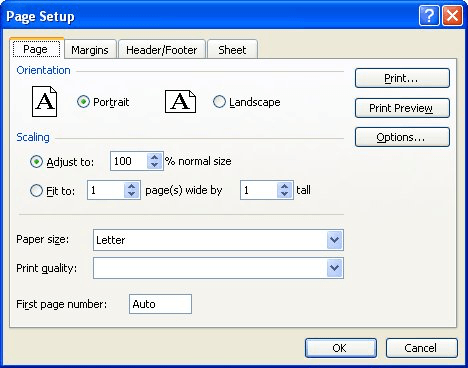
Figure 1. The Page tab from the Page Setup dialog box.
ExcelTips is your source for cost-effective Microsoft Excel training. This tip (2666) applies to Microsoft Excel 97, 2000, 2002, and 2003.
Best-Selling VBA Tutorial for Beginners Take your Excel knowledge to the next level. With a little background in VBA programming, you can go well beyond basic spreadsheets and functions. Use macros to reduce errors, save time, and integrate with other Microsoft applications. Fully updated for the latest version of Office 365. Check out Microsoft 365 Excel VBA Programming For Dummies today!
Printing more than a single page? You may want to add page numbers to your printout, as discussed in this tip.
Discover MoreHow do you want your page numbers to appear on your printed worksheets? Chances are good that you want them to be ...
Discover MoreWhen you print a larger worksheet, Excel breaks the printout across several pages. You may want to know, before you ...
Discover MoreFREE SERVICE: Get tips like this every week in ExcelTips, a free productivity newsletter. Enter your address and click "Subscribe."
2022-09-13 16:32:16
Colby
Sure. Easy. But why doesn't it adjust the number of total pages? I am starting at page 5, and now the end is displaying as page 15 of 10, rather than 15 of 15.
2021-11-10 06:14:53
HinnIn excel when in the Page Setup area, I'm wanting to change the 'First Page Number'. Do you know if there is a limit to what number I can put in? I get the error message 'Integer is not Valid'. It seems to occur when the value is ~31,000
Got a version of Excel that uses the menu interface (Excel 97, Excel 2000, Excel 2002, or Excel 2003)? This site is for you! If you use a later version of Excel, visit our ExcelTips site focusing on the ribbon interface.
FREE SERVICE: Get tips like this every week in ExcelTips, a free productivity newsletter. Enter your address and click "Subscribe."
Copyright © 2026 Sharon Parq Associates, Inc.

Comments