
Please Note: This article is written for users of the following Microsoft Excel versions: 97, 2000, 2002, and 2003. If you are using a later version (Excel 2007 or later), this tip may not work for you. For a version of this tip written specifically for later versions of Excel, click here: Changing Excel's Starting Date.
Excel allows you to choose which arbitrary date you use as the beginning point for serial numbers. In the PC world, this date is January 1, 1900. If you are working with Excel workbooks imported from the Macintosh environment, however, you will want to set the starting date to January 2, 1904—the date used on the Mac.
To set which of these two dates is used, follow these steps:
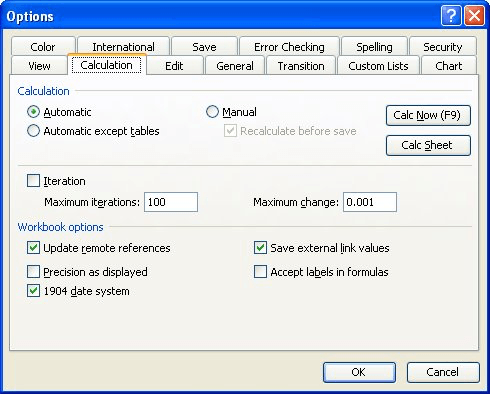
Figure 1. The Calculation tab of the Options dialog box.
ExcelTips is your source for cost-effective Microsoft Excel training. This tip (2413) applies to Microsoft Excel 97, 2000, 2002, and 2003. You can find a version of this tip for the ribbon interface of Excel (Excel 2007 and later) here: Changing Excel's Starting Date.

Professional Development Guidance! Four world-class developers offer start-to-finish guidance for building powerful, robust, and secure applications with Excel. The authors show how to consistently make the right design decisions and make the most of Excel's powerful features. Check out Professional Excel Development today!
Hate to take your fingers off the keyboard? Here's how you can move from worksheet to worksheet without touching the mouse.
Discover MoreExcel doesn't provide a keyboard shortcut that allows you to zoom in or out on your workbook. It is easy, however, to ...
Discover MoreAfter customizing your Excel toolbars, it is a good idea to make a backup of the file that contains the information. ...
Discover MoreFREE SERVICE: Get tips like this every week in ExcelTips, a free productivity newsletter. Enter your address and click "Subscribe."
There are currently no comments for this tip. (Be the first to leave your comment—just use the simple form above!)
Got a version of Excel that uses the menu interface (Excel 97, Excel 2000, Excel 2002, or Excel 2003)? This site is for you! If you use a later version of Excel, visit our ExcelTips site focusing on the ribbon interface.
FREE SERVICE: Get tips like this every week in ExcelTips, a free productivity newsletter. Enter your address and click "Subscribe."
Copyright © 2026 Sharon Parq Associates, Inc.
 Please Note:
This article is written for users of the following Microsoft Excel versions: 97, 2000, 2002, and 2003. If you are using a later version (Excel 2007 or later), this tip may not work for you. For a version of this tip written specifically for later versions of Excel, click here:
Please Note:
This article is written for users of the following Microsoft Excel versions: 97, 2000, 2002, and 2003. If you are using a later version (Excel 2007 or later), this tip may not work for you. For a version of this tip written specifically for later versions of Excel, click here: 
Comments